Highport orbital control
Limits and quotas
Every ceiling here exists so that one passenger cannot make the station unusable for everybody else. None of them should surprise you, because the API names the one you hit.
Almost every number on this page is a default. It is set by whoever runs this deployment and differs from one deployment to the next, so the figure your account is actually held to is whatever that deployment set. Most refusals name it. The domain limit answers this identity holds 3 domains and the limit is 3, and an oversized manifest answers the manifest declares 20000 entries; the limit is 10000 (BARD_MAX_MANIFEST_ENTRIES). Where a number is fixed for everybody and cannot be configured, it says so below.
Every number on this page belongs to a deployment rather than to the station. Orbital Control enforces what it was handed, and names the one you met rather than making you guess.
What you can hold
| What you hold | Default | Error you get | How to free some up |
|---|---|---|---|
| Domain registrations | 3 | QuotaExceeded (429) |
Release a domain |
| Tiles | 20 distinct record keys | TileAuthorNotPermitted when you validate; TileQuotaExceeded when the tile is indexed |
Delete a tile record |
| Validated records waiting to be published | 5 distinct records, or 2 GiB of content | PreparedQuotaExceeded |
Publish one, or validate something else in its place |
| Connected spaces | 10 | SpaceQuotaExceeded (429) |
Disconnect a space |
| Names reserved under one of your domains | 20, or the maxNames you set, never above the deployment's ceiling |
DelegationQuotaExceeded (429) |
Release a reservation |
Four notes on that table.
A name somebody reserves for you under their domain counts against their limit for that domain and never against your domain registrations. It has no expiry: it lasts until one of you releases it or their domain stops serving names. Handing out names under your domain has the rest.
A new version of a tile you already hold takes no new slot. The tile count is over distinct record keys, and it is checked only when the key is new, so republishing a tile at the limit is not refused. Deleted, expired and rejected versions do not count. Tiles you have validated but not yet published do count, because we have already fetched and stored their files.
Only one preparation is ever live per record. So the usual way to meet the third limit is to have started a lot of different records, not to have validated the same one over and over. Validating a different version of the same record supersedes the previous preparation and frees nothing extra, because it never occupied a second slot.
PreparedQuotaExceeded is not an error. It comes back on a 200 from validate as prepared: false with reason: "PreparedQuotaExceeded". Your record is still valid. We have not held its files for you, and will not until you clear some room. The refusal carries no number, so the count in the table is all you have.
How big a site can be
| Cap | Default | What it counts | Error name |
|---|---|---|---|
| Manifest entries | 10 000 | Entries in the manifest that actually serves, before the paths we add ourselves | InvalidManifest, or TileInvalid under a tile binding |
| Site bytes | 1 GiB | Every entry's declared size, plus notFound, plus any blob inside a parameter |
InvalidManifest, or TileInvalid under a tile binding |
| Resolved parameters | 64 KiB | The JSON your parameters become, after references are resolved | ParametersTooLarge |
| Redirects | 256 | Rules in one record. Fixed — not configurable on any deployment | InvalidManifest |
| One manifest key | 2048 bytes | The path itself, and each redirect's from and to. Fixed |
InvalidManifest |
Both of the first two caps are measured on the manifest that actually serves. For a site bound to a tile that is the tile's manifest, with the tile's entries and the tile's declared sizes. So what counts against your site is what the tile ships, and the error name changes to TileInvalid to tell you the manifest was not one you wrote. A tile published on its own is held to these same two caps, and both are reported as TileInvalid. A blob you pass in as a parameter is served at its own path and counts against the byte total.
Validate reports every independent rejection at once, so a ten-path mistake is one publish cycle and not ten. Two faults are exceptions to that. Going over the entry count comes back on its own, so twenty thousand path errors do not bury the real one. And a key that will not parse suppresses the check that every redirect target is a real path, because a path set short one entry would report the wrong redirect.
The 10 000-entry cap is not the one you will reach first. A manifest travels inside a request body, and that body is capped at 2 MiB. A realistic entry, meaning a hashed path, a MIME type, a contentType override and a contentEncoding, runs about 258 bytes. So roughly eight thousand of them fill the 2 MiB, and a manifest at the documented entry cap cannot be submitted at all. The refusal is a plain-text 413 that names neither a limit nor a field, and the ceiling is not configurable. The same ceiling sits on the record write, so you cannot publish a record you could not validate.
The site editor shows you a running total and has nothing to compare it to. The resource table's status line reads {n} resources, {size} as you add files, but the caps are not published to the browser, so the editor cannot warn you as a total climbs. You find a cap by crossing it, in errors[] on the next validate.
How big one file can be
Your files go to your own account, so your account server's limit, your PDS's, is what applies to any single file. Ours does not come into it. Go over it and you get that server's own message, word for word, with the size in it. It is the one that refused you, so it is the one that knows why. The editor keeps the first such message for the session and shows it above the file table as Your PDS refused a file: followed by the server's words. We do not paraphrase it, because paraphrasing drops the number that makes it actionable.
Separately, one upload request to the Hub is capped at 64 MiB by default. That is a limit on the request and not on the file, applied to the upload route alone so it does not also cap a record you submit. A body over it is a 413 before anything is read. You will almost certainly never see it.
Bandwidth
Bandwidth is the one limit here that is spent by other people rather than by you, and it works differently from everything above.
Whether any of it is running is the operator's decision. A deployment can run with no bandwidth accounting at all: nothing is measured, nothing is ever refused, and the Observatory has nothing to report. Where accounting is on, measuring and refusing are two separate settings, so a deployment can count every byte and refuse nothing. That is the default. Everything below about a reader being turned away describes a deployment that has deliberately turned refusal on.
What is measured, and where
Nothing is measured while your files are being served. Measurement happens afterwards, at the edge, out of the web server's access log. A response costs its body plus a flat allowance for header bytes, which that log cannot record. So every byte figure in the Hub is an estimate, and says so beside the number instead of in a footnote. How each status counts is on that page. Crawler traffic counts, because it is real egress and the alternative rewards pretending to be a browser.
Your allowance, and the period
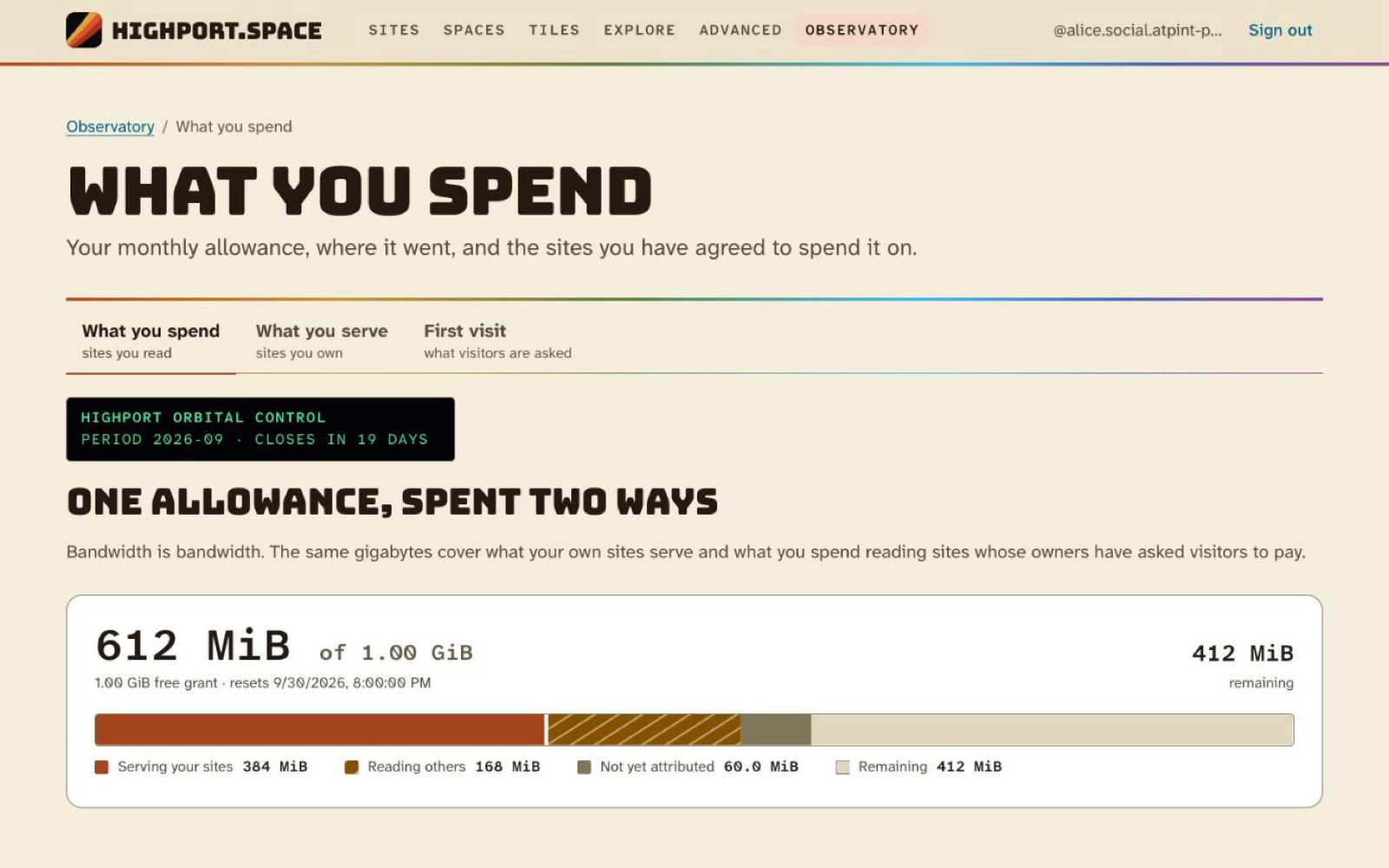
An identity has one allowance, and it is spent two ways: on what your own sites serve, and on what you read at sites whose owners have asked readers to bring their own bandwidth. One meter, not two. Two meters side by side would be a truthful-looking lie, because somebody under half on each would read themselves as comfortable while being out of allowance.
The allowance is a free monthly grant, 1 GiB by default, plus any entitlement the operator has recorded against your identity. There is no control anywhere that grants one, so on most deployments the free grant is all you have.
A period is a UTC calendar month, and it resets at midnight UTC on the 1st. It is not an anniversary of when you signed up, and it is the same boundary in every deployment. An allowance is fixed when the month's row is first written, so a grant that lapses part-way through a month cannot retroactively shrink an allowance you have already spent against.
What one site gives to anonymous readers
The number you control is per domain, and it answers one question: how much of your own allowance this site spends on readers who have not signed in. It has three states.
| Setting | What happens |
|---|---|
0 |
None of your bandwidth goes to this site. Anybody who wants to read it signs in first, and what they read comes out of their own allowance. |
| A figure | You give the first n each month. Until that is used up anybody can read without signing in; after that, reading needs a sign-in and comes out of the reader's own allowance. |
| No limit | Anybody reads without signing in, and it all comes out of your allowance. |
A reader who signs in never touches this figure at all, whatever you set. What they read comes out of their own allowance. Signing in is always offered on every setting, and this only decides what happens for a reader who has not.
Two of those three are promises about turning somebody away, so they depend on the deployment doing it. Where refusal is off, a site set to 0 serves every anonymous reader on your bandwidth and reports that it spent nothing, and a finite figure serves past its ceiling for the rest of the month. No limit is the one state that holds either way. Setting 0 is therefore not a way to make a site sign-in-only. Asking visitors to sign in is, and it is enforced in every deployment.
Two things sit outside the figure. A signed-in reader who runs out of their own allowance falls back to you, and that overflow is drawn from your allowance but does not count against this figure, so the number means one thing and not two. And any path you have gated with requireAuth always requires a sign-in and is always drawn from the reader's own allowance, whatever this is set to.
Seeing where it went
Your allowance and its split are in the Observatory, at https://hub.highport.space/observatory, under Your activity. One meter, segmented into what your own sites served, what you spent reading others, what is not yet attributed to a domain, and what is left. A segment labelled Not yet attributed is normal: the total and the per-domain breakdown are written by different passes and can disagree by one window's worth of traffic.
Per-domain figures, meaning requests, bytes, busiest paths, status mix and who signed in, are on the traffic view for each site, reached by choosing the site inside Activity on your sites. The chart there is drawn in one of two measures, switched by the Bytes and Requests controls above it and written into the address as ?measure=requests, so a link to one is a link to that one and the back button undoes a switch. Bytes is the default, because bytes is what an allowance is spent in; requests is the same thirty days counted rather than weighed, and it is what tells a large file fetched once apart from a page read a thousand times. Byte figures are estimates and request figures are not, for the reason under the chart. That view also splits the traffic by the published revision of your record that served it: the record CID is on every response and in every logged row.
Figures on both screens move on the rollup boundary, ten minutes by default, and not in real time. Refusal is quicker than the screens: the counter that decides one moves within seconds of a request.
If you are building your own tools, the methods behind both screens are space.highport.manage.getConsumption, getSiteTraffic, listSiteVisitors and getMyActivity. All four are in the space.highport.authManage permission set, so a grant that carries it carries them. See XRPC. getMyActivity takes no subject parameter and never will. It is the one query in the system that draws a cross-site picture of a person, and what makes it acceptable is that only its subject can ask it.
Setting or changing a cap
The control is the Whose bandwidth panel on the site's own page in the Hub: "How much of your own bandwidth goes to people reading this site, and what happens once it is used up." It is domain configuration and not a field on your record, so it saves on its own, immediately, with no validate-and-publish step.
The slider's stops are 0, 100 MiB, 250 MiB, 500 MiB, 1 GiB, 2 GiB, 5 GiB, 10 GiB, 25 GiB, and No limit. Those are the values the panel offers. space.highport.manage.setDomainBilling accepts any non-negative number of bytes as ownerBudgetBytes, and a value set between two stops displays at the stop below it, so re-saving from the panel would lower it. A site configured before this panel existed opens at a position the panel inferred rather than one you chose, and saving writes that inference back. Read the position before you save.
The panel carries a second slider, "Most any one reader may use, per month", which records a per-reader ceiling on this domain. It is stored and reported back to you, and nothing enforces it today. Setting it neither refuses a reader nor changes what anybody spends.
You do not set anybody's allowance, your own included, and there is no control anywhere that grants bandwidth. Granting bandwidth is the operator's job.
Lowering a cap below what has already been spent
Nothing is retroactive. Nobody is re-refused for something they have already read, and nothing you change reaches back into the month.
Lowering a finite figure below current usage takes effect on the next pass that counts anonymous bytes for that domain. On a site with traffic that is about a minute, because the domain's settings are cached for sixty seconds. On a site with no anonymous traffic it does nothing at all until somebody reads it anonymously.
Lowering it to zero takes effect within about thirty seconds, and by a different route. A zero is answered from the domain's own row without waiting for a byte to be counted.
Raising it back above current usage does not lift the block at once. A refusal stands until its hold at the edge lapses, up to ten minutes by default, and there is nothing to press in the meantime.
Nothing tells you an allowance is running down. The Observatory's meter and the site's traffic view are what you have.
What a visitor sees when an allowance is gone
Two different things, and they are not the same problem. When a site is unavailable is the visitor's side of both, and it prints the exact page each one gets.
The bandwidth you give this site is spent, or set to zero. Somebody opening a page is redirected to that site's own sign-in form, on your hostname, carrying the path they wanted. Something the page loads, an image or a stylesheet or a script, is refused outright instead of redirected. A reader who signs in is served and it comes out of their allowance. Readers already signed in are unaffected.
Your whole allowance is spent. Every request answers 402 Payment Required, with a small page naming the account whose allowance is empty and the moment it resets. That takes the site down for everybody, signed in or not, and it is served for images and stylesheets as well as pages, so a picture on your site is replaced by that message too. A reader whose own allowance is spent meets the same 402 on a site you have set to 0, because that setting also says you are not giving them any of yours.
/.well-known/atproto-did is served past both refusals. If your domain is also your handle, it goes on resolving after everything else on the site has stopped. Its bytes are still counted.
Rate limits
| What | Limit | Counted per | What comes back |
|---|---|---|---|
| Signing in | 20 per minute | client address | bare 429 |
| Re-checking a domain | 1 per 30 seconds | domain, per caller | RateLimitExceeded |
| Preparing a record | 60 per hour | identity | RateLimitExceeded |
reindex and purge, together |
30 per minute | identity | RateLimitExceeded |
| Anything you do in the Hub | 600 per minute | browser session | RateLimitExceeded |
Any authenticated /xrpc call |
300 per minute | identity | RateLimitExceeded |
| The public read methods | 600 per minute | client address | bare 429 |
Checking a domain is one request every thirty seconds per domain, and the message says so: one verification per thirty seconds per domain. Only the checks you ask for count against it. We re-check on our own schedule between your requests, so polling harder gains you nothing.
Signing in is capped per address, not per handle. Separately, a sign-in that fails for any reason to do with the identity returns one message for every cause, that identity could not be used to start a sign-in; check the handle and try again, so the response cannot be used to find out whether a handle exists.
Two of these are enforced in front of us rather than by us. The two counted per client address belong to the web server, so a refusal is a bare 429 with a Retry-After and no {"error", "message"} body. A client that expects the error envelope on every non-2xx is wrong on those two paths. They are also properties of this deployment's web server rather than of the service, so do not assume the numbers anywhere else.
Whichever one you hit: back off and wait. Do not retry in a loop.
Things that expire
A registration you never verify is released after 168 hours, and the name goes back to being unclaimed. Registering it again starts the process over. See bringing your domain alongside, which also covers what happens to a domain that stops proving itself after it has been verified.
A preparation carries an expiry, 72 hours out by default, reported as expiresAt when you validate and again on getIndexStatus. Nothing collects a lapsed one, though, so what actually frees its slot is publishing that record, or validating a different version of the same record in its place.
Neither one loses you anything. If you wrote a record it is still in your account, where it always was, and nothing we do can remove it from there. See editing, deleting and moving on.
Asking for more
Quotas are set by the operator, not by the software. If you are running into one for a good reason, write to the address on the moderation policy and ask.
Site owners · 10 of 12